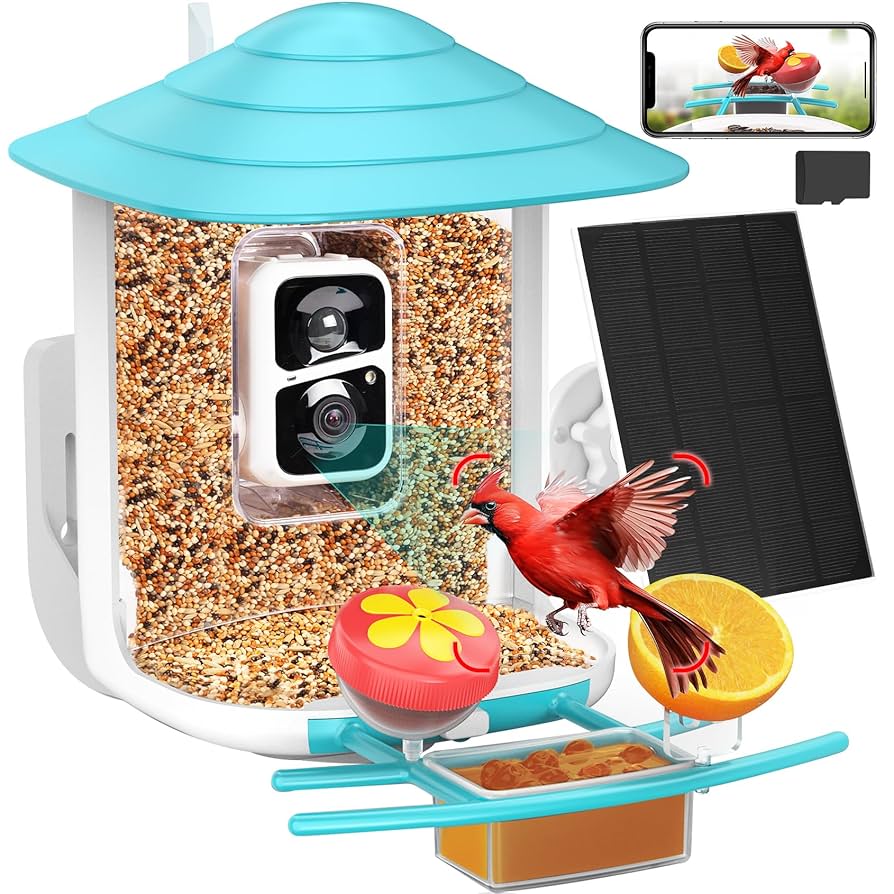
Wireless Camera for Bird Feeder lets you discover the hidden world of backyard birds. Watch every flutter, chirp, and landing in real time—without disturbing them.
A wireless camera for your bird feeder lets you do just that. It captures every moment clearly and sends it right to your phone or computer. Whether you’re a bird lover, photographer, or just want to add a little magic to your backyard, this simple tool can bring nature closer than ever before.
Keep reading to discover how to choose the perfect wireless camera and turn your bird feeder into a live window to the wild.
Choosing The Right Wireless Camera
Watching birds at your feeder is fun and relaxing. A wireless camera lets you see close-up views without disturbing the birds.
Picking the right wireless camera is important. It helps you get clear images and easy setup for your bird feeder.
Key Features To Look For
Look for features that make your bird watching better. Good image quality helps you see details clearly.
- High resolution for clear pictures
- Night vision to see birds in low light
- Motion detection to catch bird visits
- Weatherproof design for outdoor use
- Easy wireless connection to your phone or computer
- Wide viewing angle to cover the feeder area
Popular Camera Types
Different cameras offer different benefits. Choose one that fits your needs and setup.
- Wi-Fi cameras connect directly to your home network
- Battery-powered cameras for flexible placement
- Solar-powered cameras that recharge with sunlight
- Hidden cameras that blend into the feeder
- Pan and tilt cameras to change the view remotely
Budget Considerations
Cameras come in many price ranges. Decide how much you want to spend before buying.
Higher prices often mean better image quality and extra features. But basic cameras can still work well.
- Low cost: Basic models with simple features
- Mid-range: Good image quality and some extras
- High-end: Advanced features and best video quality

Credit: www.amazon.ca
Setting Up Your Camera
Setting up a wireless camera for your bird feeder lets you watch birds up close. This guide helps you place and connect your camera easily.
Follow simple steps for the best view and smooth operation of your camera.
Ideal Placement Tips
Place the camera where it can see the birds clearly. Avoid spots with too much sun or shade.
Keep the camera steady and safe from wind or rain. Aim it at the feeder from a short distance.
- Mount the camera 3 to 6 feet away
- Avoid areas with strong backlight
- Choose a spot with clear view of the feeder
- Use a branch or pole to fix the camera
- Check for obstacles blocking the lens
Power Sources And Battery Life
Wireless cameras use batteries or external power. Choose a power source that fits your setup and needs.
Rechargeable batteries work well but need charging. Solar panels can help extend battery life outdoors.
- Use rechargeable batteries for easy reuse
- Check battery life before long use
- Solar panels add power in sunny areas
- Keep spare batteries ready
- Charge batteries fully before use
Connecting To Wi-fi
Connect your camera to Wi-Fi to view live videos on your device. A strong signal helps avoid interruptions.
Follow the camera’s app instructions to link it to your network. Place the camera within Wi-Fi range for best results.
- Use a Wi-Fi network with good signal strength
- Set up the camera using the official app
- Keep the camera close to the router if possible
- Restart your router if connection fails
- Secure your network with a strong password
Optimizing Camera Settings
Setting up your wireless camera for a bird feeder helps you see birds clearly. Adjusting the camera settings improves your viewing experience.
Good settings help capture clear images and videos. You can also get alerts when birds arrive.
Motion Detection And Alerts
Motion detection helps the camera notice when birds move near the feeder. This saves battery and storage by recording only when needed.
Set the motion sensitivity to avoid false alerts from wind or leaves. Adjust alert settings to get notifications on your phone.
- Lower sensitivity reduces false alerts
- Higher sensitivity catches smaller bird movements
- Enable alerts to stay updated in real time
Image And Video Quality
Choose the right resolution for clear pictures and videos. Higher resolution shows more detail but uses more storage.
Adjust frame rate for smooth video. Lower frame rates save space but may look choppy.
- Use 1080p or higher for sharp images
- Set frame rate to 15-30 fps for smooth videos
- Balance quality and storage based on your needs
Night Vision Capabilities
Night vision lets you watch birds after dark. Infrared lights help the camera see without scaring birds away.
Check the night vision range to cover the feeder area. Adjust brightness if your camera allows it for better pictures.
- Infrared lights provide clear night images
- Longer night vision range covers more area
- Adjust brightness for less glare on birds
Attracting Birds To Your Feeder
Using a wireless camera at your bird feeder helps you watch birds closely. It makes feeding birds more fun and safe.
To attract many birds, choose the right feeder and seeds. Create a friendly space for birds to visit often.
Best Feeders And Seeds
Select feeders that suit different bird types. Use seeds that birds love to get more visitors.
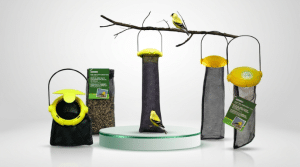
- Tube feeders hold sunflower seeds and attract finches and chickadees.
- Platform feeders work well for larger birds and mixed seed blends.
- Hopper feeders store seeds and protect them from rain.
- Nyjer seeds attract small birds like goldfinches.
- Black oil sunflower seeds draw many bird species.
Creating A Bird-friendly Environment
Place feeders near shrubs or trees for cover. Birds feel safer when they can hide quickly.
Keep the area clean and free of pests. Fresh water nearby also helps birds stay healthy.
- Use natural plants to provide shelter and food.
- Keep feeders away from windows to avoid bird collisions.
- Clean feeders regularly to prevent disease.
- Add a birdbath with fresh water.
Seasonal Considerations
Change seeds and feeding times based on seasons. Birds need different foods in cold or warm months.
In winter, provide high-energy seeds. In spring, offer foods that support nesting and young birds.
- Winter: sunflower seeds and suet for energy.
- Spring: millet and fruit for growing birds.
- Summer: fresh water and insects attract many birds.
- Fall: offer seeds that help birds store fat for migration.
Capturing Stunning Wildlife Shots
Using a wireless camera for your bird feeder helps you take close-up photos of birds. You can watch birds without disturbing them. This lets you catch natural moments and beautiful shots.
Birds move fast and can be shy. Getting great pictures takes some skill and patience. Knowing how to use your camera well will improve your photos a lot.
Timing And Patience
Birds do not stay still for long. To capture good shots, wait quietly and watch carefully. The best photos come from being calm and patient.
Early morning or late afternoon is the best time to photograph birds. The light is soft, and birds are more active. Avoid sudden moves to keep birds comfortable.
Using Burst Mode
Burst mode takes many photos in a short time. This helps capture fast bird actions like flying or eating. You increase the chance of getting a perfect shot.
- Hold the camera steady while using burst mode
- Choose the best photo from the burst series
- Use burst mode for quick movements
Tips For Clear And Sharp Images
Clear images show details like feathers and colors. Use a fast shutter speed to avoid blur. Make sure your lens is clean before shooting.
Focus on the bird’s eyes for sharp photos. Use good lighting to help your camera capture details well. Keep the camera steady or use a tripod if possible.
- Clean the camera lens regularly
- Use autofocus on the bird’s eye
- Use a tripod for steady shots
- Shoot in good natural light
- Select a fast shutter speed

Credit: www.amazon.ca
Storing And Sharing Your Footage
Wireless cameras for bird feeders capture amazing moments. You need to store and share these videos easily.
Choosing the right storage and sharing options helps keep your footage safe and lets you show it to others.
Cloud Vs Local Storage
Cloud storage saves your videos online. You can access them anytime from any device.
Local storage saves videos on a memory card or hard drive. It does not need internet to work.
- Cloud storage offers easy backup and remote access
- Local storage gives fast access without internet
- Cloud may have monthly fees
- Local storage depends on the size of your memory device
Editing Basics
You can trim, crop, and adjust your bird videos. Simple edits make your clips clear and enjoyable.
Use editing apps or software on your phone or computer. Most apps are easy to learn and use.
- Cut unwanted parts to focus on birds
- Adjust brightness for better view
- Add slow motion to see details
- Save edited videos in common formats
Sharing On Social Media
Sharing your bird feeder videos lets friends and family enjoy your footage. Social media is a popular way to share.
Choose the right platform depending on your audience. Use clear titles and descriptions to help viewers understand your videos.
- Upload videos directly from your device or cloud
- Use hashtags to reach bird lovers
- Share short clips for better engagement
- Respect privacy when sharing publicly
Maintaining Your Wireless Camera
Keeping your wireless camera clean and updated helps it work well. Regular care extends the camera’s life.
Check your camera often to fix small problems early. This keeps your bird feeder views clear and steady.
Regular Cleaning
Clean the camera lens gently to remove dust and dirt. Use a soft cloth to avoid scratches.
Remove spider webs and debris from the camera case. This keeps the camera clear and protects it from damage.
- Use a microfiber cloth for the lens
- Do not use harsh chemicals
- Clean the camera every two weeks
- Check the mounting for dirt or damage
Firmware Updates
Update your camera’s firmware to improve performance and fix bugs. Firmware controls how your camera works.
Check the manufacturer’s website or app for updates. Install new versions when available for better security.
- Connect the camera to Wi-Fi
- Open the camera app or website
- Look for firmware update option
- Follow instructions to install updates
Troubleshooting Common Issues
If the camera stops working, check the power source first. Loose batteries or cables cause many problems.
Restart the camera to fix minor glitches. Reset the device if problems continue.
- Ensure the camera has enough battery or power
- Check Wi-Fi connection strength
- Restart the camera by turning it off and on
- Reset the camera to factory settings if needed

Credit: www.amazon.ca
Frequently Asked Questions
How Does A Wireless Camera For Bird Feeder Work?
A wireless camera for bird feeders uses Wi-Fi to transmit live video. It captures footage of birds visiting the feeder. The camera connects to an app on your smartphone or tablet. This allows you to monitor bird activity in real-time.
Some models offer features like motion detection and night vision.
What Are The Benefits Of Using A Wireless Camera?
A wireless camera allows you to observe birds from anywhere. You can view live footage on your smartphone. It helps in identifying bird species and their behavior. Some cameras offer features like motion alerts. This enhances your bird-watching experience greatly.
Can I Use A Wireless Camera In Any Weather?
Most wireless cameras for bird feeders are weatherproof. They are designed to withstand rain, snow, and wind. However, extreme weather conditions may affect performance. It’s essential to check the camera’s specifications for weather resistance. Proper installation can also protect the camera from harsh elements.
Do Wireless Cameras Affect Bird Behavior?
Generally, wireless cameras do not affect bird behavior. They are designed to be unobtrusive and blend with the environment. The birds usually adapt to the presence of the camera. It’s important to position the camera at a distance. This ensures minimal disturbance to the birds.
Conclusion
A wireless camera for your bird feeder lets you enjoy nature up close. It captures bird visits without disturbing them. You can watch birds from anywhere using your phone. Setting it up is simple and quick. This small device brings big joy to bird lovers.
Try it to see your backyard in a new way. Watching birds has never been easier or more fun.