Imagine watching your favorite birds up close without disturbing them. A wireless bird camera lets you do just that.
It brings the beauty of nature right to your fingertips. You can capture stunning moments, learn about bird behavior, and enjoy peaceful outdoor scenes anytime you want. If you love birds or want to start a new hobby, this device is perfect for you.
Keep reading to discover how a wireless bird camera can change the way you connect with nature.

Credit: www.amazon.ca
Choosing The Right Wireless Bird Camera
Watching birds up close is fun and relaxing. A wireless bird camera helps you see birds without disturbing them.
Choosing the right camera can be tricky. You need to know what features and types fit your needs.
Key Features to Look For
Look for clear picture quality. A good camera shows details of birds even from far away.
Battery life is important. Longer battery life means more time watching without charging.
- High resolution for sharp images
- Night vision for low light
- Strong wireless connection
- Weatherproof design
- Easy setup and use
Camera Types and Models
There are different types of wireless bird cameras. Some are fixed, and others are portable.
Fixed cameras stay in one spot. Portable cameras you can move to different places easily.
- Spot cameras for steady viewing
- Pan-tilt cameras to change direction remotely
- Hidden cameras for natural bird behavior
- Solar-powered cameras for long outdoor use
Budget Considerations
Wireless bird cameras come in many price ranges. Decide how much you want to spend before buying.
Cheaper models may lack some features. More expensive ones offer better quality and options.
| Price Range | Features | Best For |
|---|---|---|
| Low ($50 – $100) | Basic video, short range | Beginners or casual watchers |
| Medium ($100 – $200) | Better resolution, night vision | Regular bird watchers |
| High ($200+) | High quality, advanced features | Serious hobbyists and professionals |
Setting Up Your Wireless Bird Camera
Setting up a wireless bird camera lets you watch birds up close. You can see their behavior without disturbing them.
Follow simple steps to place and use your camera well. This helps you get clear and interesting bird footage.
Selecting The Best Location
Pick a spot where birds often visit. Look near feeders, birdhouses, or flowering plants.
Choose a place that is quiet and safe. Avoid busy areas with lots of people or pets.
- Near food or water sources
- Places with good natural light
- Hidden spots to avoid scaring birds
- Areas with little wind or rain exposure
Mounting And Positioning Tips
Mount your camera at bird height or slightly above. This gives clear views of their actions.
Point the camera where birds usually perch or feed. Make sure it stays steady and secure.
- Use sturdy mounts or brackets
- Avoid direct sun glare on the lens
- Keep camera lens clean and free of obstructions
- Test angles before final installation
Power Sources and Battery Life
Wireless bird cameras run on batteries or solar power. Choose based on how long you want to record.
Check battery life often to avoid losing footage. Carry extra batteries if needed.
- Use rechargeable batteries for cost savings
- Solar panels help extend battery life
- Turn off camera when not in use
- Keep power sources protected from weather
Optimizing Camera Settings
Wireless bird cameras need the right settings for clear images. Adjusting these settings helps you capture birds better.
Good settings save battery and improve the camera’s performance in different conditions.
Adjusting Focus and Resolution
Set the camera focus to get sharp bird images. Use manual focus if the camera allows it.
Choose a resolution that balances quality and file size. Higher resolution gives more detail but uses more storage.
- Manual focus works better for close-up shots
- Auto focus is good for moving birds
- Use 1080p or higher for clear videos
- Lower resolution saves battery and space
Motion Detection and Trigger Speed
Set motion detection to catch birds without missing moments. Adjust the trigger speed to capture fast movements.
Faster trigger speeds reduce blur but may use more battery. Find a balance that fits your needs.
- Set sensitivity to avoid false triggers
- Fast trigger speed captures quick bird actions
- Lower sensitivity saves battery
- Test settings in your birdwatching area
Night Vision And Low Light Options
Use night vision to see birds in the dark. Infrared lights help capture images without scaring birds.
Adjust low light settings to improve image brightness. Some cameras let you change exposure or use noise reduction.
- Infrared mode is quiet and invisible
- Higher ISO helps in low light but adds noise
- Use noise reduction to clear images
- Test night vision during dusk or dawn
Credit: www.walmart.com
Connecting And Using Wireless Features
Wireless bird cameras use Wi-Fi and Bluetooth to connect with your devices. These features let you watch birds live and control the camera remotely.
Understanding how to set up and use these wireless functions will improve your bird watching experience.
Wi-fi And Bluetooth Setup
Start by turning on the camera’s Wi-Fi or Bluetooth mode. Use the camera’s app or settings to find and connect to your phone or tablet.
Follow the on-screen instructions to complete the connection. Keep your devices close for a strong signal during setup.
- Turn on camera Wi-Fi or Bluetooth
- Open the app on your device
- Search for the camera’s network
- Connect and enter any required password
- Confirm connection in the app
Remote Viewing and Control
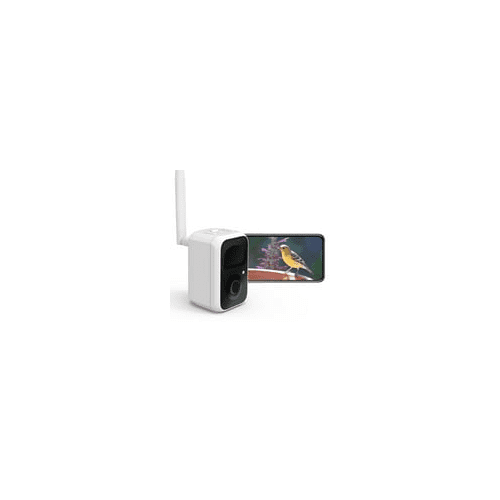
Once connected, you can see live video from the bird camera on your device. The app lets you zoom, pan, and adjust settings remotely.
This feature helps you watch birds without disturbing them. You can control the camera even if you are far away.
- View live video feed on your device
- Use controls to change camera angle
- Adjust video quality and settings
- Take snapshots or record videos
- Monitor birds anytime, anywhere
Data Storage and Transfer
The camera saves photos and videos to memory cards or cloud storage. You can transfer files wirelessly to your device for easy access.
Some apps allow automatic backup of your data. This keeps your bird watching memories safe and organized.
- Save files on SD card inside the camera
- Use Wi-Fi to transfer files to your device
- Upload videos and photos to cloud storage
- Set automatic backups in the app
- Manage and delete files remotely
Techniques For Stunning Birdwatching Shots
Using a wireless bird camera lets you capture birds from a distance. You can take clear, close-up photos without scaring them away.
To get great shots, you need to use the right techniques. These tips help you take beautiful bird photos.
Timing And Patience
Birds are active at different times of the day. Early morning and late afternoon are best for photos.
Wait quietly and stay still. Patience helps you catch rare moments and natural poses.
Using Natural Light
Natural light makes bird colors look bright and real. Use soft light during sunrise or sunset for warm tones.
Avoid harsh midday sun that causes shadows. Position yourself so the light shines on the bird’s side or front.
Capturing Bird Behavior and Action
Birds show many behaviors like flying, feeding, or singing. Watch carefully to capture these moments.
Use fast shutter speed to freeze motion. This helps capture clear action shots of birds in flight.
- Focus on the bird’s eyes for sharp images
- Use burst mode to take many photos quickly
- Keep your camera steady for sharp shots

Credit: www.amazon.ca
Maintaining And Troubleshooting Your Camera
Keeping your wireless bird camera in good shape helps it work well for a long time. Small issues can stop your camera from working right.
Regular care and knowing how to fix common problems saves time. It also keeps your camera ready to capture bird moments.
Regular Cleaning and Care
Clean your camera often to stop dirt and dust buildup. Use a soft cloth to wipe the lens gently.
Keep the camera dry and avoid touching the lens with fingers. Check the battery and charge it when needed.
- Use a microfiber cloth for cleaning
- Avoid water near the camera
- Charge the battery fully before use
- Store the camera in a safe place
Common Issues and Fixes
Sometimes the camera may not connect to Wi-Fi. Restart the camera and router to fix this.
If the video is blurry, clean the lens or check the focus. Low battery can cause the camera to shut off.
- Restart camera and router for connection problems
- Clean lens for clear video
- Check battery level and charge if low
- Reset camera if it freezes
Firmware Updates and Support
Keep your camera’s software up to date. Updates fix bugs and add new features.
Check the camera app or website for update alerts. Contact support if you find problems you cannot fix.
- Check for firmware updates regularly
- Follow instructions to install updates
- Keep app updated for best performance
- Contact support for technical help
Popular Accessories for Bird Cameras
Bird cameras help you watch birds up close. Accessories make your camera work better.
Choosing the right add-ons keeps your camera safe and makes filming easier.
Protective Cases And Covers
Protective cases stop damage from rain, dust, and bumps. They keep your camera safe outdoors.
Covers also help hide the camera so birds stay calm and natural around it.
- Waterproof cases guard against rain and moisture
- Shockproof covers protect from drops and hits
- Camouflage covers blend the camera into nature
Additional Power Solutions
Extra power lets your camera run longer in the wild. This is key for long bird watching sessions.
Power banks and solar chargers keep your camera working without needing a plug.
- Portable power banks offer backup battery life
- Solar panels recharge batteries using sunlight
- Extra rechargeable batteries make quick swaps easy
Mounts And Tripods
Mounts and tripods hold your bird camera steady for clear pictures and videos.
They help place the camera at the right angle and height for the best view.
- Tripods provide stable support on uneven ground
- Clamp mounts attach cameras to branches or poles
- Flexible mounts allow easy adjustment of camera position
Frequently Asked Questions
What Is A Wireless Bird Camera?
A wireless bird camera is a device that captures images and videos of birds. It uses wireless technology to transmit data. These cameras are often used for bird watching and research. They provide a non-intrusive way to observe birds in their natural habitat.
How Does A Wireless Bird Camera Work?
Wireless bird cameras capture images and videos using built-in sensors. They transmit data to a receiver or cloud storage. These cameras often use Wi-Fi or Bluetooth for connectivity. Some models have motion detection and night vision features for enhanced observation.
What Features Should I Look For?
Look for high resolution, motion detection, and night vision. Consider battery life and storage options. Wi-Fi or Bluetooth connectivity is important for easy data transfer. Ensure the camera is weatherproof if used outdoors. Portability and ease of setup are also crucial.
Can A Wireless Bird Camera Withstand Bad Weather?
Many wireless bird cameras are designed to be weatherproof. They can withstand rain, snow, and wind. Check the camera’s IP rating for weather resistance. This ensures the camera continues to operate effectively in various weather conditions. Always refer to the manufacturer’s specifications for detailed information.
Conclusion
Wireless bird cameras bring nature closer to your home. They let you watch birds without disturbing them. Easy to set up and use, these cameras fit any garden or balcony. You can enjoy birdwatching anytime, even from inside. Clear images and live feeds make every moment special.
They help you learn about birds and their habits. A wireless bird camera is a great way to connect with nature daily. Simple, fun, and educational—perfect for all ages. Give it a try and see birds like never before.